
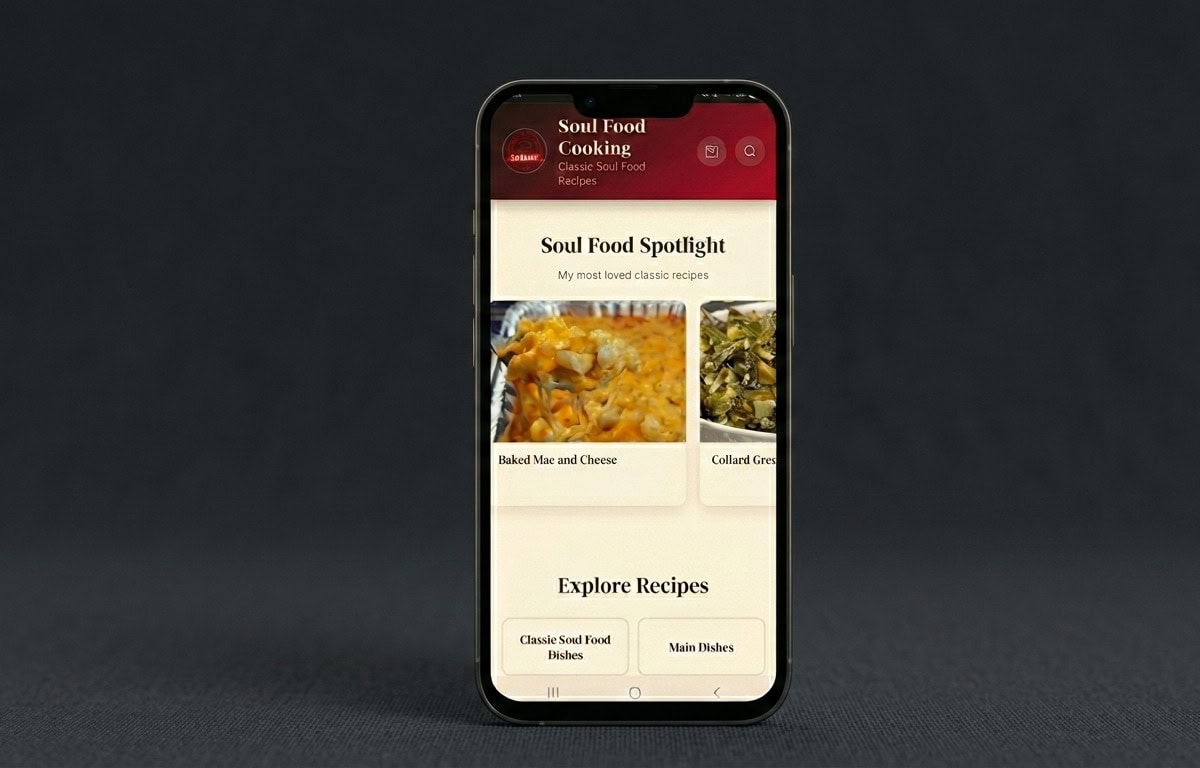
Soul Food Cooking App
Your favorite recipes are now just one tap away! The Soul Food Cooking app puts all of my recipes right on your phone or tablet, and it’s completely free. No app store needed, no downloads, no storage space taken up. Just a quick install and you’re ready to cook!
And here’s the best part: turn on notifications and you’ll be the first to know every time I drop a new recipe. No more missing out. No more scrolling through social media hoping to catch the latest post. The recipe comes straight to YOU.
Ready to get started? Pick your device below and follow the steps. It takes less than 30 seconds!
FOR iPHONE AND iPAD (Safari)
- Step 1: Open Safari on your iPhone or iPad. It has to be Safari for this to work, not Chrome or any other browser.
- Step 2: Go to soulfoodcooking101.com/app/
- Step 3: Tap the Share button at the bottom of the screen. It’s the square icon with the arrow pointing up.
- Step 4: Scroll down and tap “Add to Home Screen.”
- Step 5: Tap “Add” in the top right corner.
That’s it! You’ll see the Soul Food Cooking icon on your home screen just like any other app. Open it from there and you’re good to go!
Important: Your iPhone or iPad needs to be running iOS 16.4 or newer. To check, go to Settings, then General, then About, and look for the Software Version.
FOR ANDROID (Chrome)
- Step 1: Open Chrome on your Android phone or tablet.
- Step 2: Go to soulfoodcooking101.com/app/
- Step 3: Tap the three dots menu in the top right corner of Chrome.
- Step 4: Tap “Install app” or “Add to Home screen.”
- Step 5: Tap “Install” to confirm.
Done! The Soul Food Cooking icon will appear on your home screen. Open the app from there and start cooking!
TURN ON NOTIFICATIONS (Don’t Skip This!)
After you install the app and open it from your home screen, you’ll see a message asking if you want to know when I post a new recipe. Tap “Subscribe” or “Yes, notify me” and then tap “Allow” when your phone asks for permission.
Once you do that, every time I publish a new recipe, you’ll get a notification sent right to your phone. You’ll always be in the loop and never miss a thing!
This is how the #SFCFamily stays connected. I can even send you special messages, holiday greetings, and cooking tips straight to your phone. It’s like having me right in your kitchen with you!
Inside the Soul Food Cooking App
This isn’t just a recipe collection. It’s your personal kitchen command center, the SFC Family in your pocket, and a whole new way to cook. Here’s what’s waiting the moment you install:
Every Recipe. One Tap Away.
The full library lives right on your home screen. Search it, scroll it, save your favorites. Whether you’re hunting down Sunday dinner or that perfect peach cobbler for company, it’s all in one place and ready to roll. No more lost bookmarks. No more “what was that recipe called again?” Just open and cook.
Search That Actually Finds Things
Type “oxtail.” Type “greens.” Type “leftover chicken.” The recipes pull up the second your fingers hit the keys. Built right into the app, fast as you can think. The way search should work.
Instant Grocery Lists
Tap any recipe and the full ingredient list jumps front and center, ready to take to the store. No scrolling past a long intro. No guessing at amounts. Just grab your phone and shop.
Recipe or Video, Your Call
From any recipe you can pull up the full written instructions with every tip and trick I share, or hop straight to the YouTube video to watch me cook it step by step. Two ways to learn. You pick.
Smart Kitchen Tools and Generators
This is where the app turns into your sous chef. The BBQ Sauce Generator gives you 18 regional sauces from across the country, from Kansas City sweet and smoky to Carolina Vinegar to Alabama White. The Spice Blend Generator hands you 50 signature blends covering everything from Cajun and Jerk to taco seasoning and BBQ rubs. Tap a region or a blend and the full recipe lays itself out, ready to mix up at home. More tools get added over time, so the app keeps getting more useful the longer you have it.
Snap. Share. Show Off.
Cook something delicious? Submit a photo of your plate right inside the app and once it’s approved, it lands on the #SFC Family Photo Wall for the whole community to see. Your fried chicken, your collards, your peach cobbler, all on display for a community of fellow soul food lovers. This is where the SFC Family really comes alive. Your kitchen, your moment, your turn to shine.
Vote, Win, Take the Crown
The SFC Family scrolls the Photo Wall and taps the heart on every dish they love. Hearts add up across the whole community in real time. At the end of every month, the photo with the most hearts wins the #SFCFamily Spotlight and gets featured front and center in the app. Past winners earn a permanent place in the Hall of Fame. Could be your smothered chicken. Could be your banana pudding. Either way, the SFC Family is cheering for you.
First to Know, Every Time
Turn on notifications and you’ll feel the buzz the moment a new recipe drops. No algorithm in the way. No waiting on an email. Fresh out of my kitchen and straight to your phone.
Always Fresh, Never Outdated
Every time you open the app with internet, it pulls in my newest recipes automatically. You never have to download a new version or push an update. The app just keeps getting better in the background.
Why I Built This for the SFC Family
For years I’ve been getting the same messages. “Barbara, I lost the recipe.” “Barbara, I can’t find that video you posted last spring.” “Barbara, life is so busy, how am I supposed to keep up with everything you’re cooking?”
I heard you. Every single time.
Between work, kids, church, and trying to actually feed your family, who has time to dig through Google or scroll past a hundred ads to find a recipe you’ve already cooked three times? Nobody. And the SFC Family deserves better than that.
So I built the app. Not just a place to find recipes, but a real home for our community. A spot where you can cook with me, share what you made, see what everybody else is putting on the table, and feel like you’re part of something bigger than another app on your phone.
This is more than recipes on a screen. It’s the SFC Family in your pocket, every single day.
Welcome home.
Everything You Want to Know
Yes, 100% free. No app store account needed, no credit card, no subscription. Just open the link in your browser and tap Add to Home Screen. That’s it. I built this for the #SFCFamily because you should never have to pay to cook a good meal.
The app gives you quick access to browse and search all my recipes. Tap any recipe and it provides an ingredient/grocery list and takes you straight to the full post on my blog or my YouTube video, so you always get the complete recipe with all my tips and step by step instructions.
Apple controls how apps get added to the iPhone home screen, and they only allow the “Add to Home Screen” feature to work through Safari. If you’re on Chrome or another browser on your iPhone, just copy the link and paste it into Safari. The whole process takes less than a minute.
Yes! When I add new recipes to the app, your phone will automatically update the next time you open it with an internet connection. You’ll always have the latest recipes without having to do anything. Turn on notifications and I’ll let you know every time something new drops.
It looks and feels just like a regular app but it installs straight from your browser with no app store at all. You get the same home screen icon and the same full-screen experience — just without any of the app store hassle.
After you install the app and open it, you’ll see a prompt asking if you want to allow notifications. Tap Allow. If you missed that prompt, you can turn notifications on in your phone settings. Once you’re opted in, you’ll get a notification every time I post a new recipe — no algorithm in the way.
Open the #SFC Family Community Kitchen inside the app and tap Submit Photo. Fill in your first name, where you’re cooking from, which recipe you made, and upload your picture. Once it’s approved, your photo goes live on the Photo Wall for the whole SFC Family to see.
Every photo on the Photo Wall has a heart button. Tap the heart on the dishes you love and your vote gets added to the count. Hearts are shared across the entire SFC Family in real time, so everyone sees the same totals. At the end of each month, the photo with the most hearts wins the #SFCFamily Spotlight and gets featured front and center in the app. Past winners earn a permanent place in the Hall of Fame. Bragging rights included.
Two right out of the gate. The BBQ Sauce Generator gives you 18 regional sauces from across the country. The Spice Blend Generator gives you 50 signature blends for everything from Cajun to curry. Tap a region or a blend, get the full recipe, and head to the kitchen. New tools get added over time, so the app keeps getting more useful the longer you have it.